One Document or a Hundred.
Generated Automatically.
Map Excel data to generate hundreds at once, or just fill in a form to create the one document you need right now.Experience an automated document workflow today.
Stop Mail Merging. Start merzing.
How much longer will you rely on Word's mail merge for document automation? Whether you're generating hundreds of documents or just need one right now, experience a modern online mail merge tool that goes far beyond the old limitations.
Merge 100 documents, get one 100-page file. Splitting into individual files means manual work or complex VBA macros.
Variable row counts per recipient can't be handled automatically. You end up editing table rows manually every time.
Even for a single urgent document, mail merge shows no mercy — you still need to build an Excel file just to fill in one record.
Individual files, auto-split with one click
Each record becomes its own file, packaged and downloaded as a single ZIP. No splitting. No macros.
Tables that expand dynamically to match your data
merzing reads the row count from your Excel data and expands the table structure in real time. No manual editing.
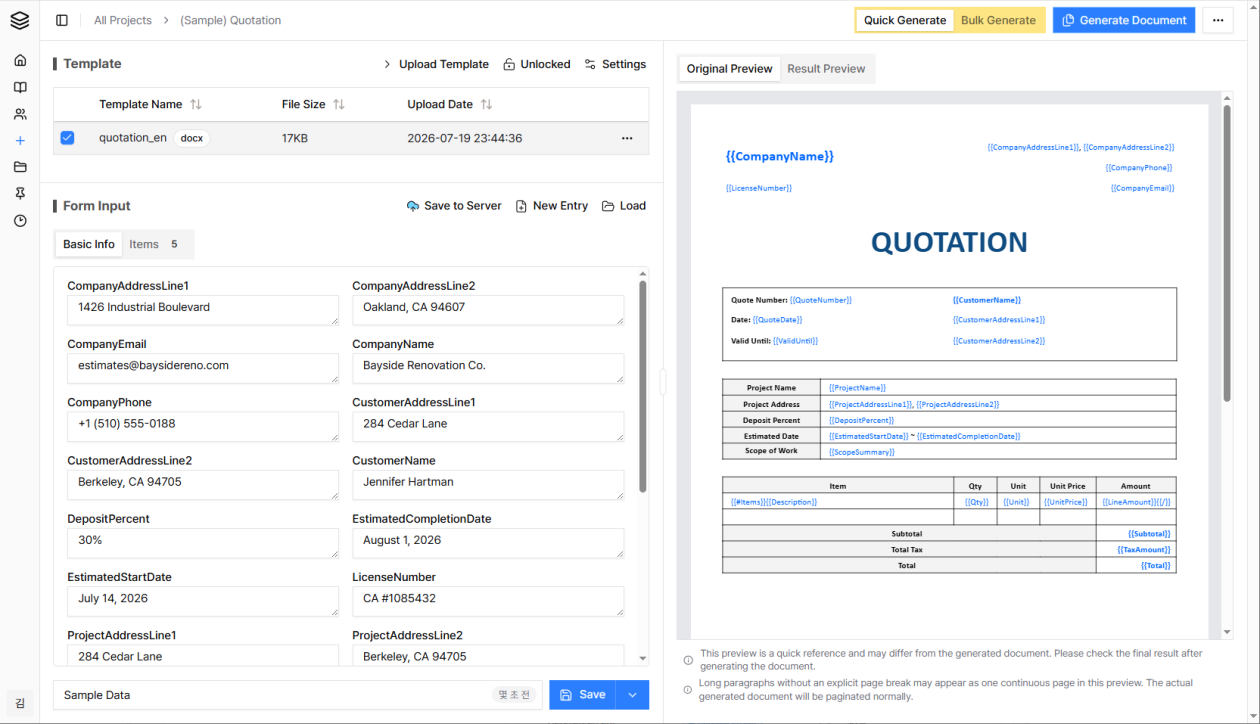
Skip the spreadsheet — generate one document instantly from a form
Type values into the form and watch the result fill in on the right in real time — then download or print it immediately.
Just one {variable} is all it takes.
The rest is automatic.
Supports Word, PowerPoint, and Excel
Use Word (docx), and PowerPoint (pptx) files as templates, and Excel (xls, xlsx) files as datasets.
Automatic variable mapping
If the variable names in your template match the column names in Excel, they map automatically. If not, you can map them manually.
Variable mapping status at a glance
The variable mapping status UI lets you verify at a glance that all variables are correctly mapped.
Variable mapping saved per project
Define variable mappings once per project and reuse them without reconfiguring each time.

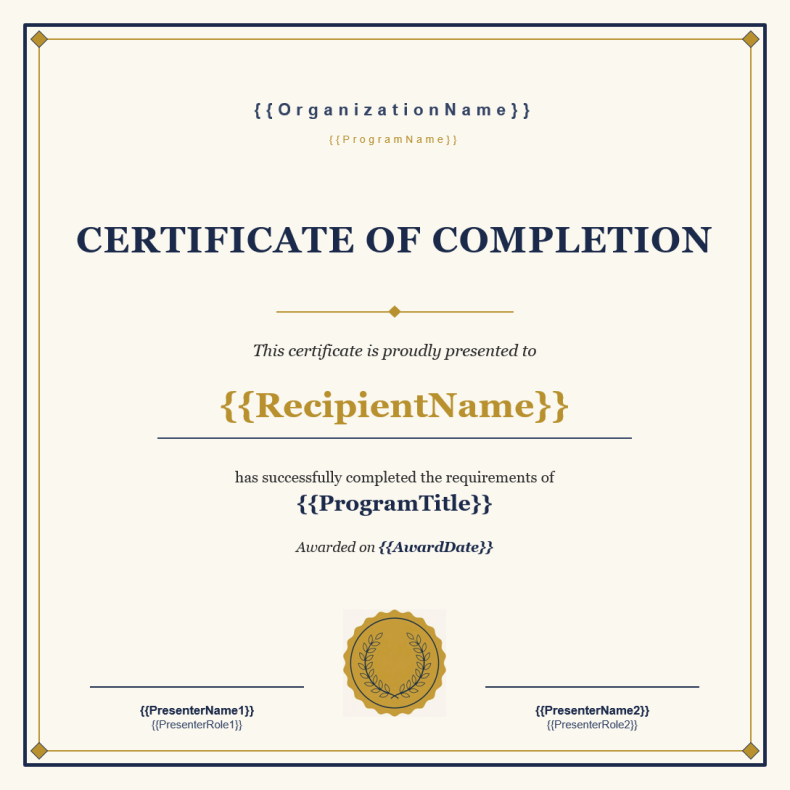
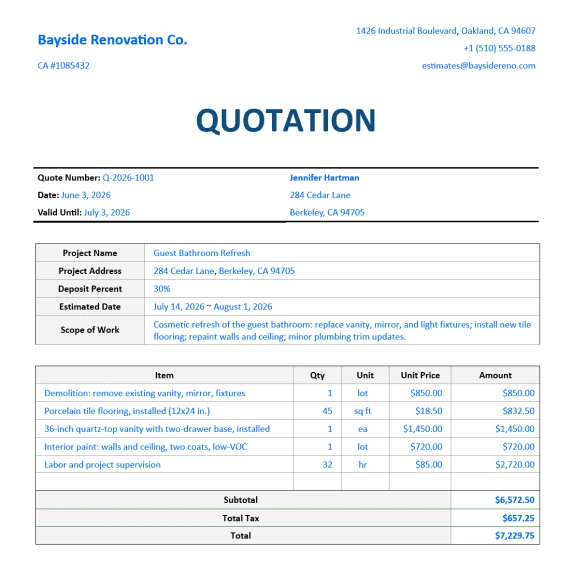
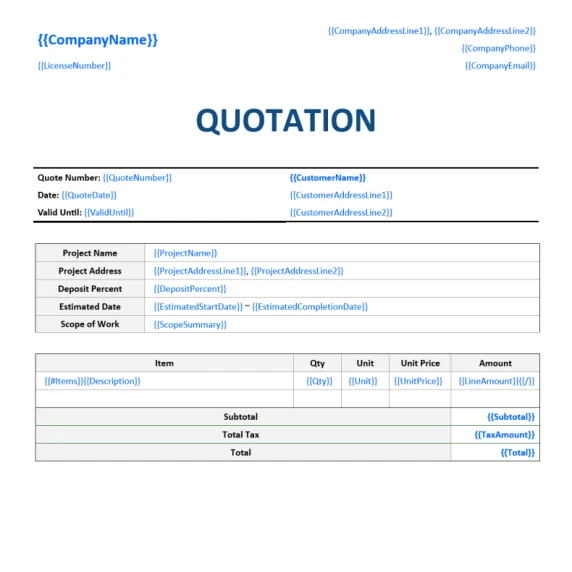
Even complex template documents
with tables work seamlessly.
Table data populated perfectly
Supports joining data from multiple Excel files
Tables auto-expand to match your Excel data rows.
When processing a single template file, you can combine data from multiple Excel files. Just set the join key between the datasets.
Sensitive data stays secure.
Excel data that may contain personal information or confidential business data is never uploaded to external servers. Only the template file and mapping rules are stored on the server.
All document generation processes run entirely within your local browser's memory, eliminating any risk of data leakage at the source. That said, if you turn on the "Save to Server" option in the quick single-document form, we also offer a convenience feature that encrypts your input and stores it on the server.
Filter to exactly what you need.
Collaborate through your workspace.
Filter only the data you need
Pick only the rows you need from large Excel datasets and generate exactly the documents you want.
Automate document filenames too
Define filename rules using column values from your Excel data to automatically name each generated document.
Collaborate with your team
Share templates and variable mapping rules with your team in a dedicated workspace environment.
From template to finished documents
in just 3 steps.
No software to install, no complicated coding. Build your online document automation system using the Word, PowerPoint, and Excel files you already work with.
Keep your existing document formats. Just add variables.
Whether it's an invoice, quotation, contract, certificate, or offer letter — open the Word(docx) or PowerPoint(pptx) file you already use, and write variable names like {ClientName} or {TotalAmount} where data should go.
Create a project and upload your template file — your automation setup is complete.
Select your dataset file, and the data falls into place.
Select the Excel(xls, xlsx) file containing your data. If the template variables match the column names in Excel, they are mapped automatically.
No need to worry if the names differ. The intuitive UI makes it easy to map them manually.
Generate hundreds of documents with a single click.
Filter only the data that meets specific conditions, or create rules to automatically name each file using values from Excel.
Click the "Generate" button and documents are automatically created and saved to your download folder.
Teams worldwide are already eliminating
repetitive document work.
Reduce the burden of recurring Word (docx) or PowerPoint (pptx) document tasks and focus on what matters most. Experience the flexibility of selecting only the data you need from Excel (xls, xlsx) to produce perfect documents. Explore a variety of use cases and discover how your workflow can be transformed.

Automate Quotations and Purchase Orders — No ERP Required
Keep using the Excel and Word files you already have. merzing automates quotations, purchase orders, and delivery notes without an ERP rollout or IT project, so every department can keep its own template.
Quotation & Purchase Order Generator | SMB Document Automation - View Details
Offer Letter and Employment Contract Generator for Hiring Founders
Stop rebuilding the same offer letter and employment contract for every hire. Lay out candidate details in Excel, and merzing generates polished documents automatically — so you can get back to product and sales.
Offer Letter & NDA Generator | Startup Hiring Document Automation - View Details
Batch-Generate Hundreds of Employment & Salary Contracts in One Pass
Take the burden out of your next salary negotiation season. Securely populate standard HR contracts from payroll Excel sheets directly within your local browser, keeping sensitive data perfectly safe.
HR Contract & Employment Agreement Automation Software - View Details
Generate Multi-Carrier Insurance Proposals in a Single Pass
Stop manual copy-pasting from multiple insurance carrier portals. Automatically populate unified coverage summaries and restructuring proposals directly from Excel, keeping sensitive client financial data perfectly safe.
Insurance Proposal & Coverage Summary Automation Software - View Details
Batch-Generate Incorporation Forms & Court Filings Without Error
Eliminate the risk of registry amendment orders caused by complex address typos. Automatically populate compliance-ready corporate templates and property registration documents in seconds directly within your browser.
Legal Document Automation Software | Corporate Filing Bulk Generator - View Details
Batch-Generate Hundreds of Labor Compliance Documents in Seconds
Modernize your monthly payroll advisory and annual contract renewals. Auto-populate standard employment agreements and customized payslips directly within your local browser, eliminating manual transcription errors.
Labor Law Compliance Software | HR & Payroll Document Automation - View Details
Batch-Generate Group Visa & Permit Forms Without Any Typos
Eliminate the risk of passport number transcription rejections. Securely populate strict government visa applications and official permit forms from Excel rosters directly within your local browser.
Visa Application Automation Software | Government Permit Bulk Generator - View Details
Batch-Generate Commercial Lease Agreements & Disclosures in One Pass
Take the hassle out of your next property renewal season. Automatically populate strict statutory disclosure statements and per-unit amenity checklists directly from your property Excel logs securely.
Commercial Lease Agreement Software | Property Disclosure Statement Tool - View Details
Batch-Generate Care Service Reports & Compliance Logs in One Pass
Take the heavy load out of monthly government-funded compliance reporting. Automatically populate program-specific service records and patient logs directly from Excel within your local browser securely.
Social Service Report Automation Software | Care Logs Bulk Generator - View Details
Batch-Generate Hundreds of Site Labor Contracts Instantly
Streamline your month-end labor cost settlement. Auto-fill standard compliance templates from daily attendance logs, with dynamic tables that expand to match actual working days automatically.
Construction Labor Contract Automation Software | Cost Claim Bulk Generator - View Details
Bulk Issue Prestigious Awards & Appointment Letters Instantly
Take the pressure off your next general meeting. Connect your member roster to generate hundreds of error-free certificates in seconds, keeping your official seal and layout intact.
Association Award & Appointment Letter Automation Software - View Details
Instant Report Cards & Completion Certificates
Turn Excel grade data and teacher feedback into personalized report cards instantly. Print or export beautifully formatted student records in a single click.
Report Card & Certificate Automation Software for Academies - View Details
Quotation and Invoice Generator That Pulls Straight From Your Excel Data
Stop rebuilding the same quotation or invoice for every client. Client data stays on your computer — never on an external server — while merzing generates polished Word documents in seconds.
Invoice & Quotation Generator | Freelance Document Automation - View DetailsChoose the right plan for your team size.
All users included in your plan — no per-seat fees.
※ Prices shown in USD. You will be charged in your local currency at checkout. Tax may apply.